
EUROPE
Balancing Minimalism with Operational Utility

THE PROBLEM
Paradox of Minimalist Industrial Design
THE DIAGNOSTICS
Uncovering the UX Friction Points
- Comparison overload: With the Compare Periods toggle active, the data table placed two raw numbers side-by-side with no sub-headers distinguishing Current from Previous. No calculated delta meant facility managers were doing mental math on the fly to determine whether a zone was underperforming.
- Ambiguous visualisation: The horizontal bars representing Night vs. Day energy usage per tenant office had no grid, scale, or percentage markers. It wasn't clear whether bars represented a percentage of 100% or absolute variable values. This resulted in the dashboard raising questions instead of answering them.
- Colour-reliant KPI cards: The macro KPI summary cards used colour alone to communicate consumption trends, an immediate accessibility blocker for colour-blind operators. Worse, an Up arrow in energy management signals costly waste (the opposite of what it means in standard SaaS convention) with no contextual copy to resolve the ambiguity.
THE SOLUTION
3 Low-Effort, High-Impact Improvements
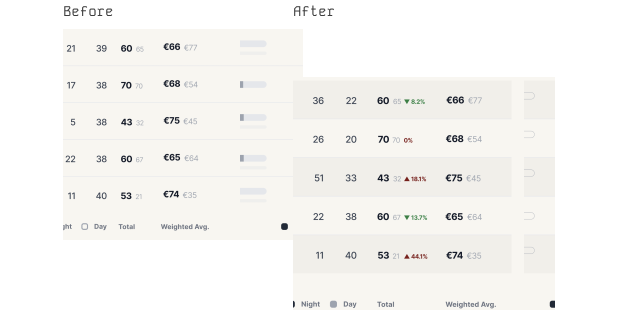
IMPROVEMENT 1 — Redesigned Comparison Architecture
Current period data stays prominent, paired with a clear delta badge — 60 ▲ 8% or €66 ▼ 12% — so operators see velocity and direction instantly. No mental math.
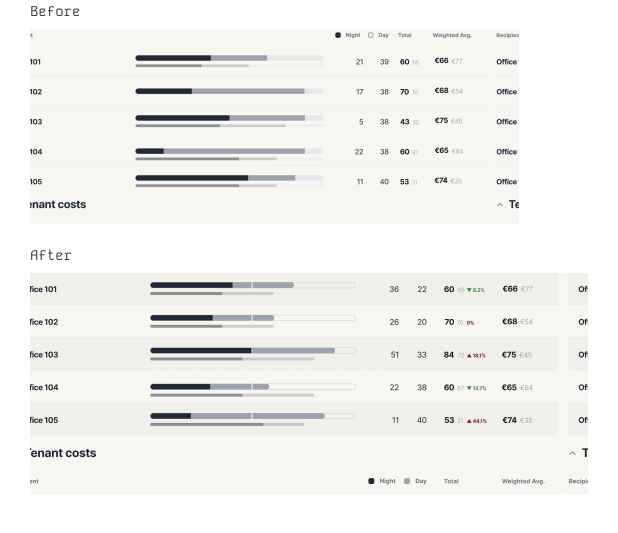
IMPROVEMENT 2 — Axis-anchored stacked bars
Ambiguous horizontal lines became structured 0–100% stacked percentage bars with a 50% midpoint guide. Asset managers can immediately see which tenants are drawing expensive peak Day energy versus lower-cost Night energy.
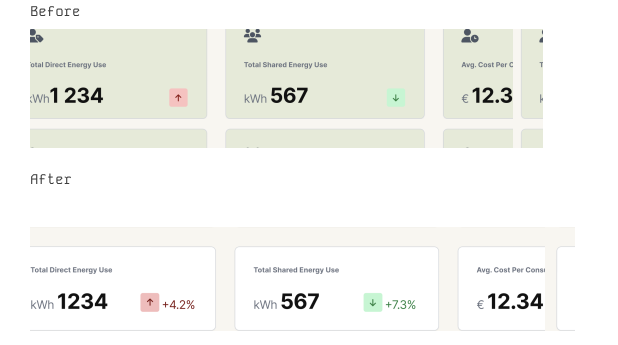
IMPROVEMENT 3 — Accessibility fix
KPI cards now pair colour shifts with explicit text labels like +4.2% vs last month, keeping the interface legible for colour-blind operators. On wide factory-floor monitors, alternating row shading helps engineers scan horizontally across dense data without losing their place.
THE RESULT